Govee Home
- 4.0
- Rating
- 5.00M
- Installs
- Free
- Price

 Analysis by App-foxy
Managing several smart devices from different rooms sounds convenient until every product seems to need its own app. I found Govee Home most useful when I wanted one place to organize Govee lighting and other compatible devices, rather than jumping between separate controls. It is a free tools app from Govee, aimed at everyone, and its basic purpose is straightforward: turn a phone into a practical control center for a connected home.
That simplicity is also the key to understanding it. This is not an all-purpose smart-home platform that automatically makes every brand work together. Its value depends on how many compatible Govee products you own and how often you want to adjust them. After spending time with it, I see it as a focused companion for people already invested in the brand, with enough control depth to be useful beyond a simple on-and-off remote.
How Govee Home feels in everyday use
I use Govee Home as a focused way to keep compatible devices organized, and the biggest everyday difference is having their controls in one familiar place. For a first setup, I’d start with one device and give it a clear room-and-purpose name before adding anything else. That small choice makes the first successful adjustment easier to find—and sets up the next step: making the app work smoothly for a real routine.
You May Also Like

 Blood Strike: 2.5 Anniversary
Blood Strike’s Loadouts Turn Every Drop Into a Tactical Gamble
A close look at Blood Strike’s custom loadouts: how fast access to signature weapons reshapes its battle royale rhythm, rewards preparation, and narrows the gap between fights.

 Pandora - Music & Podcasts
Pandora’s Music Is Easy to Start, but Harder to Recover
Pandora’s strength is its low-effort path from a seed to a station. Its weak spot is how much confidence it asks you to place in connection, setup, and quiet recovery.

 8 Ball Pool
 Is Built on Rivalries, Rematches, and Routine
A close look at the rivalries, rematches, shared routines, and unanswered safety questions that turn a quick pool match into a persistent mobile community.

 Samsung Music
’s Quiet Strength Is Playing What You Already Own
Its reach comes less from spectacle than from dependable access to a personal library. That simplicity is both the app’s strongest retention engine and its ceiling.

 AccuWeather: Weather Radar
AccuWeather Review: A Quick, Clear Forecast for Everyday Decisions
For everyday plans, the best forecast is the one you can understand quickly. AccuWeather makes rain timing, radar, and local conditions easy to act on, with a few trade-offs.

 Hill Climb Racing
Why Hill Climb Racing Still Turns Crashes Into One More Run
A tiny car, a bumpy hill and one more upgrade: Hill Climb Racing keeps resurfacing because its simple chaos makes every near-miss feel personal.
More From Our News Desk



The first impression: a focused control panel
The app opens into a device-management experience rather than trying to entertain or distract me. I can move from checking a device to changing its behavior without needing to understand a complicated smart-home vocabulary. That makes the learning curve fairly gentle for someone buying a first Govee product.
The most important early step is organizing devices sensibly. If you add products over time but leave them in an unhelpful order, the app can feel busier than it needs to be. I recommend naming devices by room and purpose immediately. “Desk light” is more useful than a model name when I am half-awake and trying to change the light beside the bed.
Govee Home has a 4.0 average from around 28 thousand ratings, and its reach is substantial, with over 5 million installs. Those figures do not guarantee that every device combination will feel perfect, but they do suggest that the app has become a familiar entry point for a large number of Govee owners.
Speed expectations and the role of the connection
In normal use, my expectation would be quick access to recently used controls, not instant response in every situation. A command can feel immediate when the phone, app, and device are communicating smoothly. At other times, the delay is more noticeable, especially when I am trying several changes in succession rather than making one simple adjustment.
That distinction matters. If I tap once to change a light, a brief pause is easy to tolerate. If I am experimenting with brightness, color, and a scene at the same time, any delay makes the interface feel less precise. I found it better to make one deliberate change, wait for the device to react, and then continue instead of rapidly tapping through multiple options.
The app’s perceived speed is therefore tied to the whole setup, not only the software. Phone performance, wireless conditions, the device itself, and the type of command all influence the experience. I would not judge Govee Home solely by the fastest response I see on a quiet network, nor solely by an occasional slow moment.
A realistic evening routine
One everyday example shows where the app earns its place. I might return home, open the app, select the living-room device, lower the intensity, and choose a warmer-looking setting before watching television. Later, I can adjust the bedroom device without walking around the house to find a physical control. The benefit is not dramatic technology; it is removing several small interruptions from a familiar routine.
That convenience becomes more noticeable when devices are placed somewhere awkward, such as behind a desk, along a wall, or above a cabinet. I do not have to reach for a hidden switch every time. I can also make a change while already sitting down, which is exactly the kind of modest improvement that makes a companion app worth keeping.
Where heavier use exposes friction
The app is more demanding when I treat it as a live control board. Switching repeatedly between several devices, adjusting settings, and checking whether each change has taken effect creates more opportunities for waiting or uncertainty. The experience is still usable, but it rewards patience more than frantic tapping.
For a larger collection, the challenge is mental rather than purely technical. The more devices I add, the more important clear names and a sensible layout become. A tidy setup feels quick because I know where to go. An untidy one makes every action take longer, even if the underlying connection is fine.
I also would not use it as my only emergency control method. If a device must be turned off immediately, a physical switch or a direct control on the product may be more dependable than opening a phone, finding the correct item, and waiting for a command to complete. That is not a criticism unique to this app; it is a practical limitation of phone-based control.
Stability during longer sessions
For ordinary adjustments, Govee Home feels like an app I can return to repeatedly without needing a special routine. Its focused purpose helps: I am not navigating a news feed, a game, or a crowded marketplace before reaching the control I need. The interface is built around the devices, so the main task remains clear.
Longer sessions are a different matter. If I spend a lot of time changing several settings, the app can feel less effortless than it does during a single quick adjustment. The issue is not that the app becomes unusable; rather, the number of steps and confirmations becomes more noticeable. I prefer planning the result first, then applying it, instead of treating the app like a rapid-fire mixing console.
That approach also makes the system easier to troubleshoot. If one change does not behave as expected, I know which action I just made. When I send many commands at once, it becomes harder to tell whether the problem is the app, the device, or the connection.
Recovery when something does not respond
Connected devices occasionally need a second attempt, and Govee Home is most comfortable when I treat a missed response as a signal to slow down rather than keep pressing. I would first check whether the correct device is selected, wait briefly, and try the command again. If several devices appear unresponsive, I would look at the phone’s connection and the devices’ power before assuming the app itself is at fault.
Clear naming helps recovery more than many people expect. When two lights have similar default names, it is easy to send a command to the wrong one and mistake that for a failed response. Room-based labels reduce that confusion. I also recommend avoiding a long chain of changes while diagnosing a problem; one test command gives much better information than five.
The app is not a replacement for basic device troubleshooting. A phone interface cannot correct a product that has lost power or a connection that is unavailable. Its strength is giving me a convenient control layer once the underlying setup is healthy.
Device constraints and compatibility
The biggest constraint is obvious but important: Govee Home is most valuable with Govee hardware. If my home contains products from several unrelated manufacturers, I would not assume this app will become a universal dashboard. People who want one broad system across many brands may be happier with a platform designed around wider compatibility, even if that means giving up some brand-specific control.
Phone requirements matter too. The app requires a device running Android 9 or later, so owners of older phones should check that point before planning around it. On supported hardware, the experience is likely to depend more on the device collection and connection quality than on raw phone power, but an aging handset can still make any control app feel less pleasant.
There is also a practical household constraint: not every person may want to use a phone for basic controls. Guests, children, or someone without access to the account may find a wall switch easier. I see Govee Home as an additional layer of convenience, not as a reason to remove every simple physical method of controlling the room.
Useful habits for a cleaner setup
My first recommendation is to name products before adding more. Use a consistent pattern such as room followed by function, and avoid names that only make sense to the person who installed the device. This pays off whenever I am tired, using the app in low light, or managing several similar products.
My second recommendation is to separate everyday adjustments from experimentation. When I am simply changing a room for dinner or relaxing, I want the shortest route. When I am exploring different effects or arrangements, I can take time to test. Mixing those two activities makes the app feel slower than it really is.
A third useful habit is to test the setup from the places where it will actually be used. A command that works beside the router may not feel equally dependable from another room. Checking this before relying on the app for a routine helps reveal whether the limitation is the phone, the network, or the device location.
Finally, I would keep a simple fallback in mind. If the app is temporarily inconvenient, I still want to know how to use the device’s own control. That small bit of preparation prevents a minor connection problem from becoming a frustrating household problem.
Who will appreciate it most
I would recommend Govee Home first to people who already own multiple Govee products or expect to build a collection within that ecosystem. The app’s focused approach makes more sense when I can manage several compatible devices from one familiar place. It is also a good fit for renters and room-by-room users who want flexible control without installing a more elaborate smart-home system.
It suits people who enjoy adjusting atmosphere as well as basic operation. Someone who wants to change a room for work, relaxation, guests, or bedtime can get more from the app than someone who only wants a single permanent setting. The ability to control devices from a phone is especially useful when the hardware is mounted out of reach.
It is less convincing for a household that owns only one simple device and rarely changes it. In that case, the product’s built-in control may be enough, and the app can feel like an extra layer. I would also steer away from it if cross-brand control is the main goal. A broader smart-home platform is probably the better starting point for that situation.
How it compares with simpler and broader alternatives
Compared with using only the physical controls on a device, Govee Home offers more convenience and a clearer way to manage several products. The trade-off is that I must open the app and depend on the phone and connection. Physical controls win for immediacy; the app wins for access, organization, and adjustments from across the room.
Compared with a general smart-home platform, Govee Home feels more specialized. A broad platform may be preferable when I want devices from many manufacturers in one place. Govee’s own app is the more natural choice when my priority is getting the most direct experience from Govee equipment rather than building a mixed-brand command center.
That comparison also explains why opinions can differ. A Govee-focused home may make the app feel coherent and efficient. A mixed collection may make it feel limited, even if the controls it does provide are perfectly useful. The right choice depends less on the app in isolation and more on the hardware already in the home.
Version, cost, and ongoing expectations
Govee Home is free, which makes trying it a low-risk decision for someone who already has compatible equipment. The current version is 7.6.10, and the app has been available since July 2, 2018. That history gives it the feel of an established companion rather than a brand-new experiment.
Its age also sets a reasonable expectation: this is a maintained control tool that should be judged by everyday dependability, not by flashy novelty. I care more about finding the right device, applying a setting, and recovering gracefully from a missed response than about whether the interface feels exciting.
The Everyone age rating makes it approachable for a household audience, although the practical experience still depends on how the devices are installed and who is allowed to control them. The app itself may be simple enough for casual use, but a well-organized setup remains the responsibility of the owner.
My performance verdict
After weighing speed, heavier use, stability, recovery, and device limits, I see Govee Home as a solid specialist rather than a universal answer. It can feel quick for single, familiar actions, while more complex sessions expose the normal friction of managing connected hardware from a phone. Its stability is most convincing when the device collection is organized and the connection is healthy.
The best performance improvement is often better organization, not faster tapping. Clear names, deliberate commands, and a fallback plan make the experience feel more reliable than an overcrowded setup with repeated guesses. Those habits are especially valuable when several similar devices are installed in nearby rooms.
I would choose it for a Govee-centered home, for remote control of awkwardly placed devices, and for anyone who enjoys changing a room’s feel throughout the day. I would skip it as a primary recommendation for a mixed-brand smart home or for someone who wants the absolute simplest physical control.
Overall, Govee Home earns its place by making compatible Govee devices easier to manage without demanding a complicated smart-home project. It is not perfect, and it cannot solve every connection or compatibility issue, but it gives the brand’s hardware a practical everyday control layer. If that matches your setup, I think it is worth installing.
FAQs for Govee Home
01What is Govee Home used for?
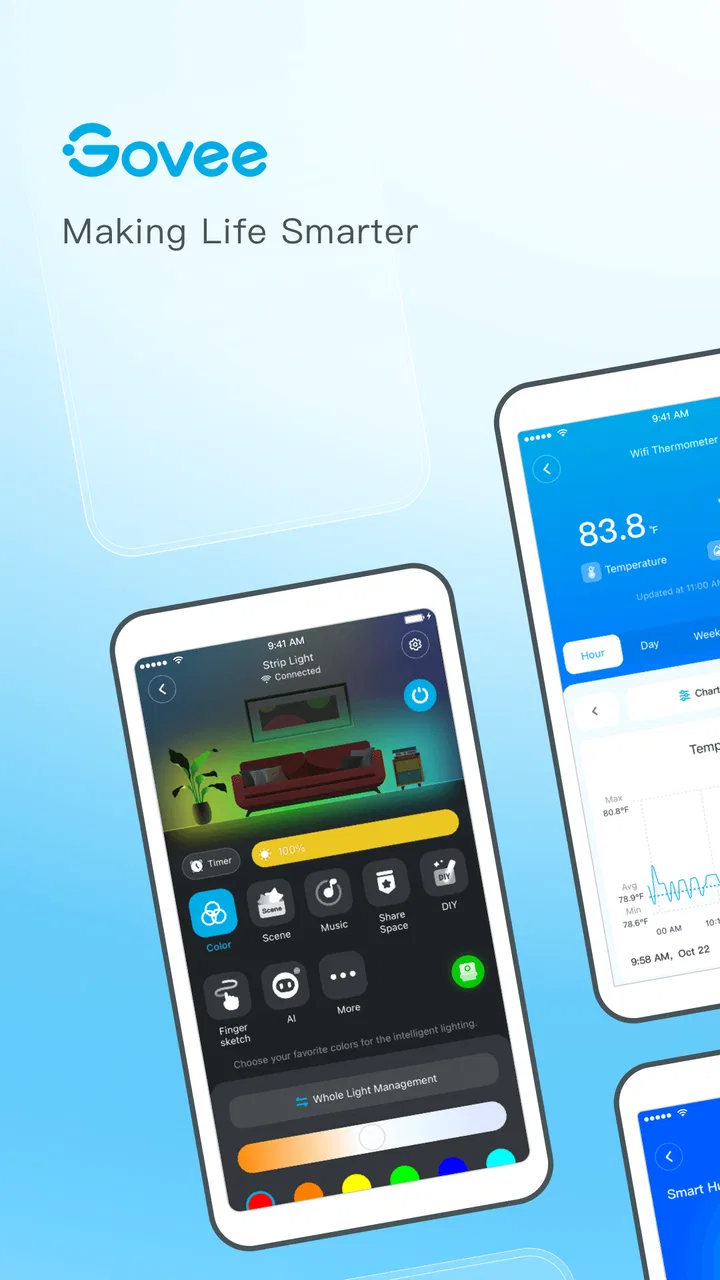
Govee Home is the companion app for managing compatible Govee smart-home products, including LED light strips, bulbs, lamps, sensors, thermometers, and other connected devices. After pairing a product, you can usually adjust settings, create scenes, schedule actions, monitor readings, and control devices from your phone instead of using physical buttons or separate remotes.
02Which devices are compatible with Govee Home?
Compatibility depends on the specific Govee product and its communication method. Many devices connect through Bluetooth, while some models also support Wi-Fi for remote access and integrations. Before downloading, check the product packaging or official listing for the required app, supported phone operating system, and whether your model needs Bluetooth, a 2.4 GHz Wi-Fi network, or additional permissions.
03Can I control Govee devices when I am away from home?
Remote control is generally available for Govee products that support Wi-Fi and have been connected correctly to your home network. Bluetooth-only devices normally need your phone to remain nearby. Features such as remote access, voice control, and automation can also vary by model, so the app may offer more functions for Wi-Fi-enabled products than for basic Bluetooth accessories.
04Does Govee Home work with Alexa, Google Assistant, or other platforms?
Many compatible Govee devices can be connected with services such as Amazon Alexa or Google Assistant, allowing voice commands for supported actions like switching lights on, changing colors, or adjusting brightness. However, integration is not universal across every product. You may need a Govee account, an active Wi-Fi connection, and the relevant smart-home app configured separately.
05Is Govee Home free, and what permissions does it require?
Govee Home is generally available as a free download, although the devices it controls are purchased separately and some features depend on the model. During setup, the app may request Bluetooth, nearby-device, local-network, notification, location, and internet permissions. These are used for discovery, pairing, connectivity, alerts, and remote functions, but requirements can differ between Android and iOS.
Pros
- Supports many Govee smart devices from one central app.
- Automation tools make it easy to schedule lights and appliances.
- Large library of lighting effects and customizable color scenes.
- Device sharing lets family members control compatible products.
- Firmware updates and setup guidance are available within the app.
Cons
- Some advanced features require creating a Govee account.
- Bluetooth and Wi-Fi setup can be confusing for first-time users.
- Performance may vary depending on device model and network quality.
- The app can feel crowded because of its store and community sections.
- Certain integrations and controls may require compatible Govee hardware.

Govee Home
Gallery